
Please use the troubleshooting below to resolve issues with your Sim Racing Studio License Keys.
- Invalid Key
- Did Not Receive SRS Premium Subscription Key
- License Validation Error
- Activation of a Sim Racing Studio Offline License
Invalid Key
If you receive an invalid key or error when attempting to activate your license key, verify that you are entering the correct alpha numeric number.
For example, do not enter the number 1 if the license key shows the letter I. They look similar; however, SRS License keys rarely contain the number 1 in the key format. Please copy and paste the key if available.
In addition, ensure there are no spaces in front or behind the license key when entering it into SRS.
Did Not Receive SRS Premium Subscription One-Time-Code
You MUST create a PayWhirl account to receive your one-time-code. Your Sim Racing Studio account will NOT be utilized. The email utilized when filling out PayWhirl's Create Your Account will receive the One-Time-Code after purchasing your subscription.
Please check the Spam and Junk Mail folders in your email app utilized when you created your PayWhirl account.
License Validation Error
If you receive a License Validation Error from Sim Racing Studio after an update, please try the following steps:
- Download the beta build from Sim Racing Studio from the downloads page here.
- Click the Latest Beta link to download the Latest Beta (version 2.35.2 or higher).
- Install the Latest Beta
- Open Sim Racing Studio and go to SETUP > License.
- Scroll down to the bottom of the page to Validation Method.

- Change the Validation Method from Current to Legacy.
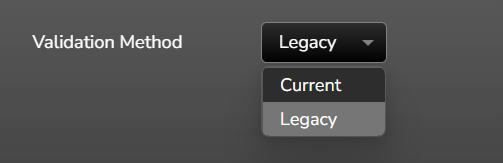
- Restart Sim Racing Studio.
Activation of a Sim Racing Studio Offline License
Please follow the guidance in the following article on how to activate your Sim Racing Studio Offline License:
https://simracingstudio.freshdesk.com/support/solutions/articles/35000316731-activation-of-a-sim-racing-studio-offline-license